
Download SwiftCompare – Free File Comparison & Synchronization Tool for Windows, Mac, Android, iOS
SwiftCompare is a powerful and intuitive software tool designed to simplify file comparison and synchronization across your devices. Whether you're managing project files, backing up documents, or keeping multiple folders in sync, SwiftCompare delivers accurate, fast, and secure results. With its dual-window interface, users can easily compare files, folders, and entire directory structures side by side.
The software highlights differences in real time, including modified, missing, or duplicated files, making it easier to identify what needs attention. After a comparison, SwiftCompare generates a detailed summary report, allowing users to make informed decisions about which files to copy, delete, or update. This makes it an ideal solution for developers, designers, and anyone who regularly works with large sets of files.
The tool supports batch operations, customizable sync rules, and secure handling of sensitive data. With regular updates and a lightweight footprint, SwiftCompare ensures optimal performance across Windows, Mac, Android, and iOS platforms.
Effortless File Comparison with a Smart Dual-Window Interface
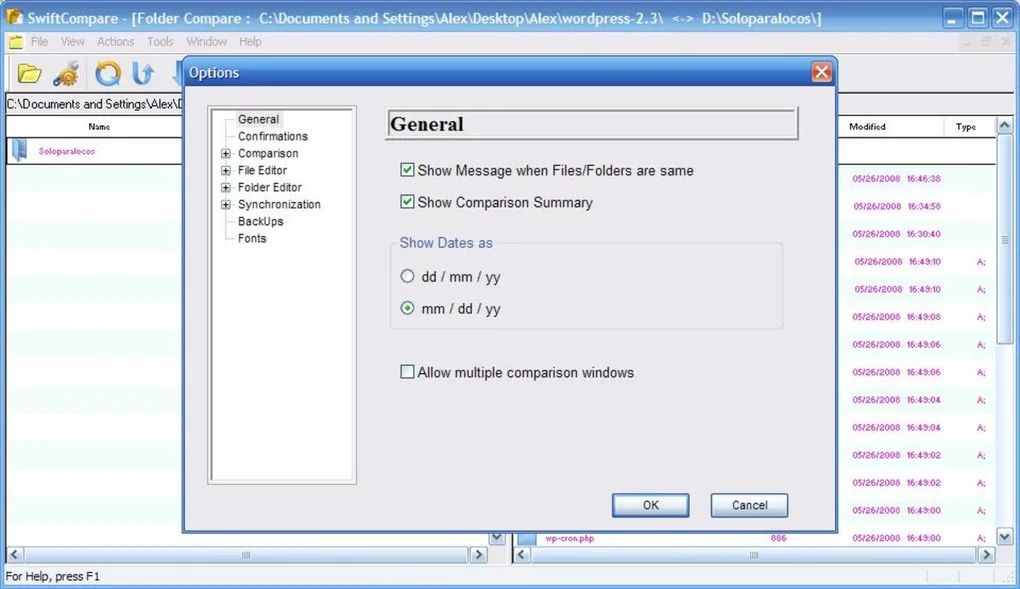
SwiftCompare stands out from other file management tools thanks to its intelligent dual-window layout, which provides a clear, side-by-side view of the files and folders you want to compare. This visual approach significantly reduces the risk of human error and streamlines the process of identifying discrepancies. Whether you're comparing two versions of a document, syncing folders between your laptop and external drive, or verifying backups, SwiftCompare makes it easy to spot changes at a glance. The interface is clean, responsive, and intuitive—no technical expertise required. You can quickly navigate through directories, filter files by type, size, or date, and even preview file contents directly within the app. One of the standout features is the real-time comparison engine. As soon as you select two folders or files, SwiftCompare begins analyzing their contents, checking for differences in file names, sizes, timestamps, and even content hashes. This ensures that even if two files have the same name and size, but different content, they will be flagged as distinct. This level of precision is invaluable for developers who need to track code changes or for teams managing collaborative projects. The software also supports deep folder comparisons, meaning it can recursively scan subdirectories and present a hierarchical breakdown of differences. This makes it perfect for synchronizing complex project structures without missing a single file. With SwiftCompare, you’re not just comparing files—you’re gaining full visibility into your data’s integrity.Smart Synchronization & Advanced Management Features
Beyond comparison, SwiftCompare excels in automated synchronization, offering users a range of options to keep their files up to date across devices. After a comparison, the tool presents a comprehensive summary of all discrepancies, allowing you to choose from multiple sync actions: copy new files, update modified files, delete outdated ones, or even create a backup of changes before applying them. This flexibility ensures that you maintain full control over your data, preventing accidental overwrites or deletions. You can also set up custom synchronization rules based on file type, size, or date—ideal for organizing media libraries, project backups, or document archives. The software supports batch processing, which means you can compare and sync multiple folder pairs in a single session, saving valuable time. For frequent users, SwiftCompare includes a scheduling feature that allows automatic comparisons at set intervals—perfect for maintaining real-time sync between work and home folders. Additionally, the tool integrates seamlessly with cloud storage services like Google Drive, Dropbox, and OneDrive, enabling cross-platform synchronization without manual intervention. Security is also a top priority: SwiftCompare uses encrypted temporary files and does not store your data on remote servers. All operations are performed locally, ensuring your sensitive information remains private. With regular updates that improve performance and add new features, SwiftCompare continues to evolve as a trusted tool for modern digital workflows.Compatibility, Installation, and Usage Guide
SwiftCompare is designed for maximum accessibility, supporting all major operating systems including Windows (7 and later), macOS (10.13 and above), Android (6.0+), and iOS (12.0+). Whether you're using a desktop, laptop, tablet, or smartphone, you can download and install SwiftCompare with just a few clicks. The installation process is straightforward: simply visit the official website, select your platform, download the installer, and follow the on-screen instructions. The app is lightweight, consuming minimal system resources, so it won’t slow down your device—even when comparing large folders. Once installed, launching SwiftCompare opens the dual-window interface where you can browse and select the folders or files you want to compare. Use the built-in search function to locate specific files quickly, or drag and drop folders directly into the comparison windows. After selecting the items, click “Compare” to initiate the scan. The results appear instantly, categorized into “Identical,” “Modified,” “New,” and “Missing” files. From there, you can review the list, preview changes, and apply sync actions with a single click. For advanced users, the settings menu allows customization of comparison criteria, sync preferences, and logging options. SwiftCompare also supports command-line execution for automation in scripts or batch files, making it a versatile tool for IT professionals and power users.Pros and Cons: Is SwiftCompare Right for You?
- Pros:
- Intuitive dual-window interface for easy side-by-side comparison
- High-precision file comparison using content hashing and timestamps
- Flexible synchronization options with customizable rules
- Supports batch processing and scheduled syncs for automation
- Lightweight and fast, with low system resource usage
- Secure local processing with no data stored on servers
- Available for Windows, Mac, Android, and iOS
- Regular free updates with new features and bug fixes
- Cons:
- Limited advanced features compared to enterprise-grade tools
- No built-in cloud backup integration (though it works with cloud folders)
- Free version lacks automated sync scheduling (available in Pro)
- Minimal documentation for beginners
- Mobile version has fewer features than desktop counterparts
Frequently Asked Questions (FAQ)
How do I download SwiftCompare for free?
Visit the official SwiftCompare website and select your operating system (Windows, Mac, Android, or iOS). Click the “Download Free” button to get the latest version. The download is secure and virus-free.
Can SwiftCompare compare files on cloud storage?
Yes, SwiftCompare can compare files stored in cloud folders (like Google Drive or Dropbox) as long as they are synced locally to your device. The app doesn’t access cloud services directly but works with local copies.
Is SwiftCompare safe to use with sensitive data?
Absolutely. SwiftCompare performs all comparisons and syncs locally. No files are uploaded to external servers, and temporary files are encrypted and automatically deleted after use.
Does SwiftCompare support folder synchronization?
Yes, SwiftCompare excels at folder synchronization. You can sync entire directory structures, including subfolders, with options to update, copy, or delete files based on your preferences.
Can I use SwiftCompare on both my desktop and mobile device?
Yes, SwiftCompare is available for Windows, Mac, Android, and iOS. You can use it across multiple devices to keep your files consistent, though the mobile version has fewer advanced features.







